Magic Audio Converter7.5.0.12
Publisher Description
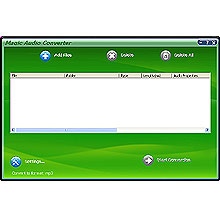
Magic Audio Converter allows you to convert audio files between WAV, OGG Vorbis, MP3, MP2, Microsoft ADPCM, WMA, VOX, GSM, G723,G726, a-LAW, u-LAW and other well-known media formats according to your wish. Its user-friendly interface supports both drag & drop and shell operation of Windows Explorer. Most work can be done automatically with a few mouse clicks. You can convert many files in batches regardless of source formats and target formmats.
Supporting most popular audio formats: WAV, OGG Vorbis, MP3, MP2, Microsoft ADPCM, WMA, VOX, GSM, G723,G726, a-LAW, u-LAW; Fast Conversion Speed: Audio format conversion is performed directly without any temporary files, and thus enables high converting speed and economy of hard disk resource; Supporting Batch Conversion: You can convert many files in a batch regardless of their source formats and target formats; Supporting Drag & Drop; Much, much more ...
About Magic Audio Converter
This Rippers & Converters program is available in English. It was last updated on 29 September, 2026. Magic Audio Converter is compatible with the following operating systems: Windows.
The company that develops Magic Audio Converter is Magic Video Software Inc.. The latest version released by its developer is 7.5.0.12. This version was rated by 1 users of our site and has an average rating of 5.0.
The download we have available for Magic Audio Converter has a file size of 7.3 MB. Just click the green Download button above to start the downloading process. The program is listed on our website since 2010-08-24 and was downloaded 1,257 times. We have already checked if the download link is safe, however for your own protection we recommend that you scan the downloaded software with your antivirus. Your antivirus may detect the Magic Audio Converter as malware if the download link is broken.
How to install Magic Audio Converter on your Windows device:
- Click on the Download button on our website. This will start the download from the website of the developer.
- Once the Magic Audio Converter is downloaded click on it to start the setup process (assuming you are on a desktop computer).
- When the installation is finished you should be able to see and run the program.
Program Details
System requirements
Download information
Pricing
Version History
version 7.5.0.12
posted on 2010-08-24
new user interface; supports more audio formats; supports Vista
version 8.3.2
posted on 2007-04-13
new user interface; supports more audio formats;
